hx Extensions Management
Centralised the admin's control over which VS Code extensions are available to their pricing model developers.
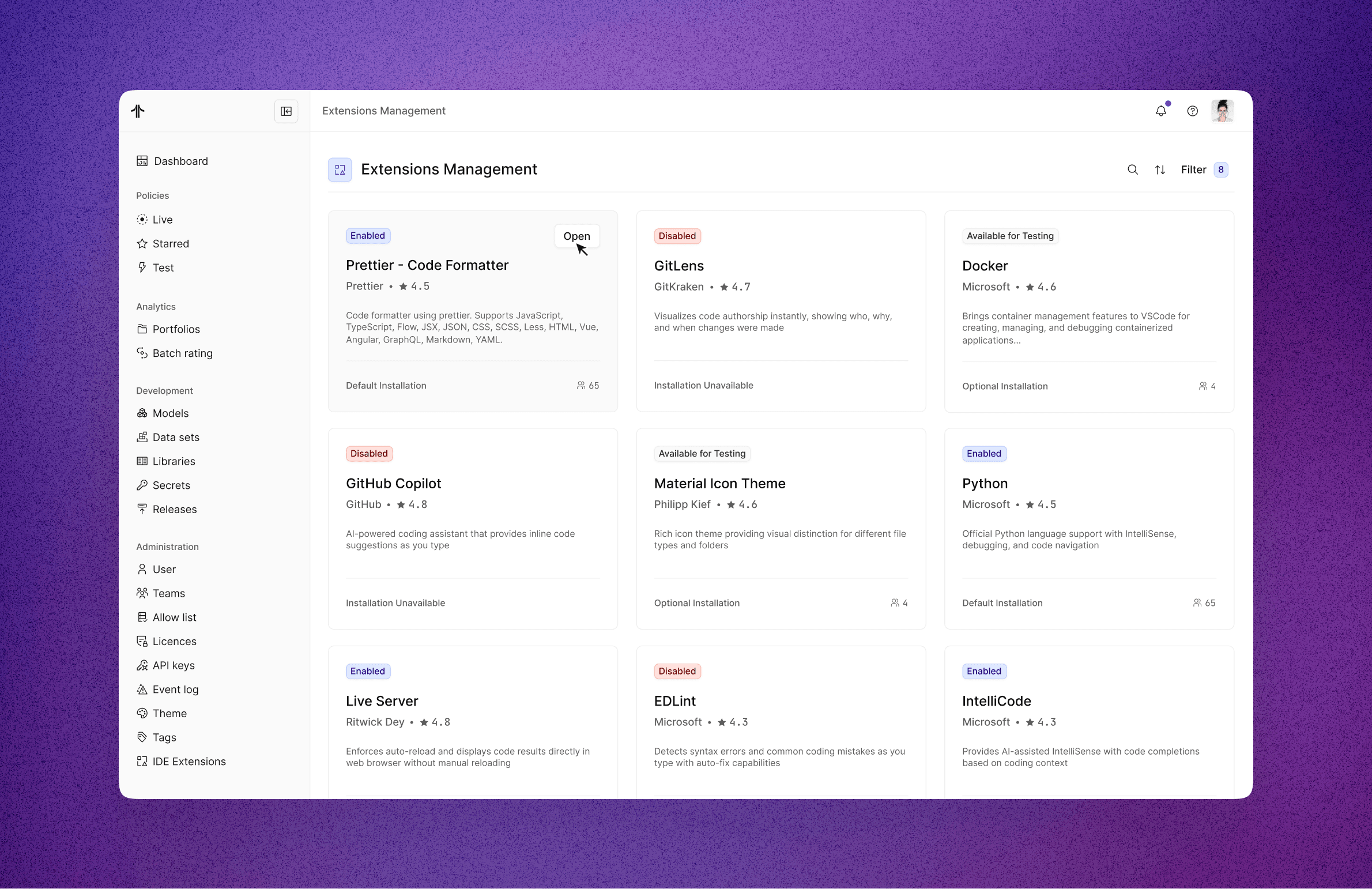
Developers rely heavily on their tooling to write, format, and maintain high‑quality code, so expecting them to stick with hx Renew’s IDE without extensions would be unrealistic in the long run. At the same time, it was important that admins still feel in control of what runs in their environments.
To balance this, the team reviewed the most commonly used extensions for model developers and curated a set of authorised, vetted options that customers can safely enable for their users. I ran some design research to understand how other tools were handling integrations, which I felt had a similar user experience than extension management in the portal.
Problem Statement:
Users of the cloud IDE struggle to safely discover, install, and use VS Code extensions because there is no managed or compliant way to support them. This limits their ability to access helpful tools and slows down their workflow.
What we aimed to solve:
The cloud IDE does not support IDE extensions, preventing model developers from installing or using productivity tools they rely on in local environments.
There is no way for administrators to manage, approve, or restrict IDE extensions within the Pricing platform, creating a gap in control, security, and standardisation.
The Actuarial Agent is only available as an IDE extension. Because extensions are unsupported, users currently have no way to install or access this tool in the cloud IDE.
The inability to support extensions directly prevents the platform from shipping key capabilities, limiting the overall value of the Pricing platform for actuarial and model-development workflows.
Workflows were critical but outdated:
The feature’s functionality was limited to simple, linear sequences.
Experiences looked almost identical for different users and different use cases.
Lack of branching limited adoption for complex enterprise use cases, so the platform was at disadvantage when compared with other workflow platforms.
Introducing complexity risked alienating less technical users > we had to be very careful or opt for a phased implementation.
Our users were mainly knowledge workers and team leads looking for ways to streamline repeated processes (everything from onboarding new employees to managing cross-functional approvals). To succeed, the solution had to be powerful yet approachable, combining enterprise-level flexibility with a modern, intuitive UX.
Research & Discovery
During discovery, I collaborated with the Product Manager to:
Run user interviews and surveys to understand bottlenecks.
Analyse support tickets to identify common pain points.
Map out workflow variations to see where conditional logic could unlock the most value.
We also ran a heuristic evaluation of the current system, highlighting where complexity increased cognitive load and where affordances were missing. From this, we defined the strategy: enable conditional branching while preserving simplicity.
Design Exploration
I explored several directions for visualising branching logic, aiming for a balance between power and clarity:
Card-based explorations for individual steps.
A zoomable canvas approach inspired by flowchart tools.
Inline condition builders for lightweight use cases.
Through iteration and testing, we arrived at a canvas-based model that provided users with a clear bird’s-eye view of their workflows while keeping individual steps lightweight and easy to edit. To reduce confusion, I also designed distinct views for assignees and assignors, ensuring each role had a tailored experience. The differences were intentionally subtle at first, giving us room to test with real users and gather insights before committing to more significant divergence.


Valeria Zschaeck 2026 ©
Lisbon, Portugal
hello@valeriazschaeck.com
Valeria Zschaeck 2026 ©
Lisbon, Portugal
hello@valeriazschaeck.com
hello@valeriazschaeck.com